UI / UX Design
IronFlow
IronFlow is a dark-mode gym companion app that empowers users to track vital fitness metrics (heart rate, weight, calories burned, sleep), visualize weekly progress through bar charts and percentage rings, discover categorized workouts (Arms, Legs, Core, etc.) with high-res photos, and stay motivated with gamified challenges, goals tracking, and personalized greetings. Designed for consistent training, it combines real-time data clarity with motivational visuals to help users build lasting strength and habits.
Year :
2025
Industry :
Gym
Client :
BodyBuilder
Project Duration :
2 weeks
Phase 1
Project Overview
The Gym Workouts App is a mobile fitness UI/UX design focused on workout tracking, progress visualization, discovery of exercises, and motivation through goals/challenges. It uses a dark theme (black/navy background) for eye comfort during gym sessions or evening reviews, orange accents (#FF6B35 approximate) for progress bars/CTAs/graphs, white/gray text for contrast, blue accents for some elements (sleep, rings), and high-resolution gym/workout photos as motivational visuals. Key screens include detailed analytics dashboard (metrics, charts, goals), personalized home/progress (greeting, progress rings, categories, challenges), and discover page (workout grid, recommendations). As solo designer, I created this in Figma, emphasizing data clarity, motivational visuals, and easy navigation to support consistent training habits.
Problem Statement
Many fitness apps overload users with cluttered dashboards, light themes causing glare in gym lighting, impersonal home screens, hard-to-read metrics, lack of quick workout discovery, and weak motivation (no clear progress % or challenges). Users struggle to track multiple metrics (heart rate, weight, calories, sleep, movement), see weekly patterns, stay motivated without gamification (goals/trophies), or find relevant workouts fast. This leads to low adherence, abandoned tracking, and demotivation. The design solves these with dark mode for gym-friendly viewing, personalized greeting + progress overview, clear metric cards with icons/units, weekly bar charts for patterns, category grid for discovery, recommendation cards with level/time/crown, and gamified elements (completed goals trophy, upgrade prompt).
Objectives
Provide dark-mode dashboard with glanceable metrics (heart rate BPM, weight KG, burned kcal, sleep hrs/mins) and visual charts.
Display date selector (calendar bar with "Today" highlight in orange) for time-based tracking.
Show progress % rings (e.g., 75% Core) with category labels and continue CTA.
Enable quick category access (running, yoga, weights, pull-up, bike icons) for workout browsing.
Curate challenges/workouts via carousel with photos, titles, coach names, heart wishlist.
Highlight achievements (completed 2 goals trophy + "Keep Upgrading" prompt + Details button).
Visualize body movement data in weekly bar chart (orange/gray fill for daily activity).
Include persistent bottom nav (Home, Discover, Saved, Analytics) for seamless switching.
Use orange for motivation (progress bars, CTAs, highlights), blue for rest metrics (sleep).
Balance data density with visual hierarchy (large numbers, icons, charts over text).
Support intermediate/advanced levels (crown icons, time/duration labels).
Phase 2
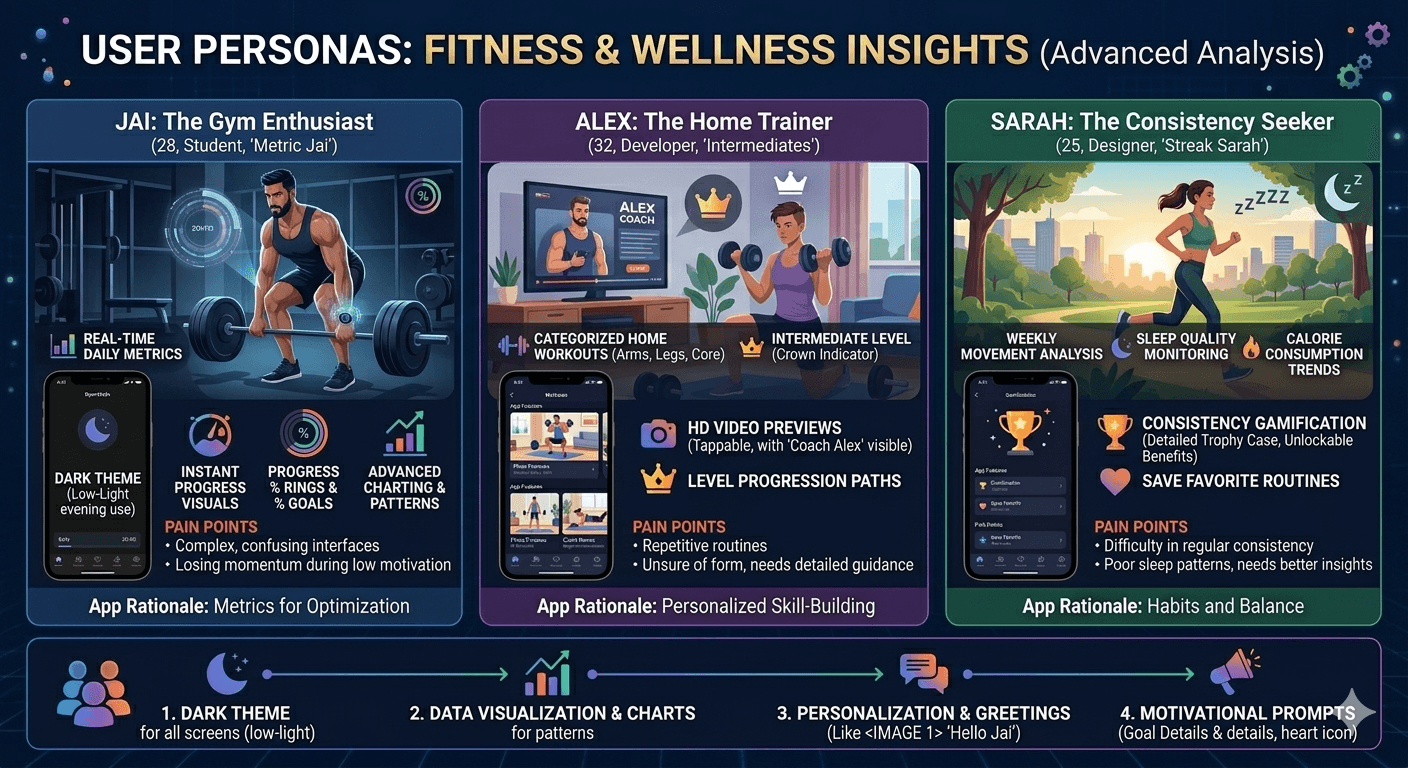
Target Users
User Journey Map
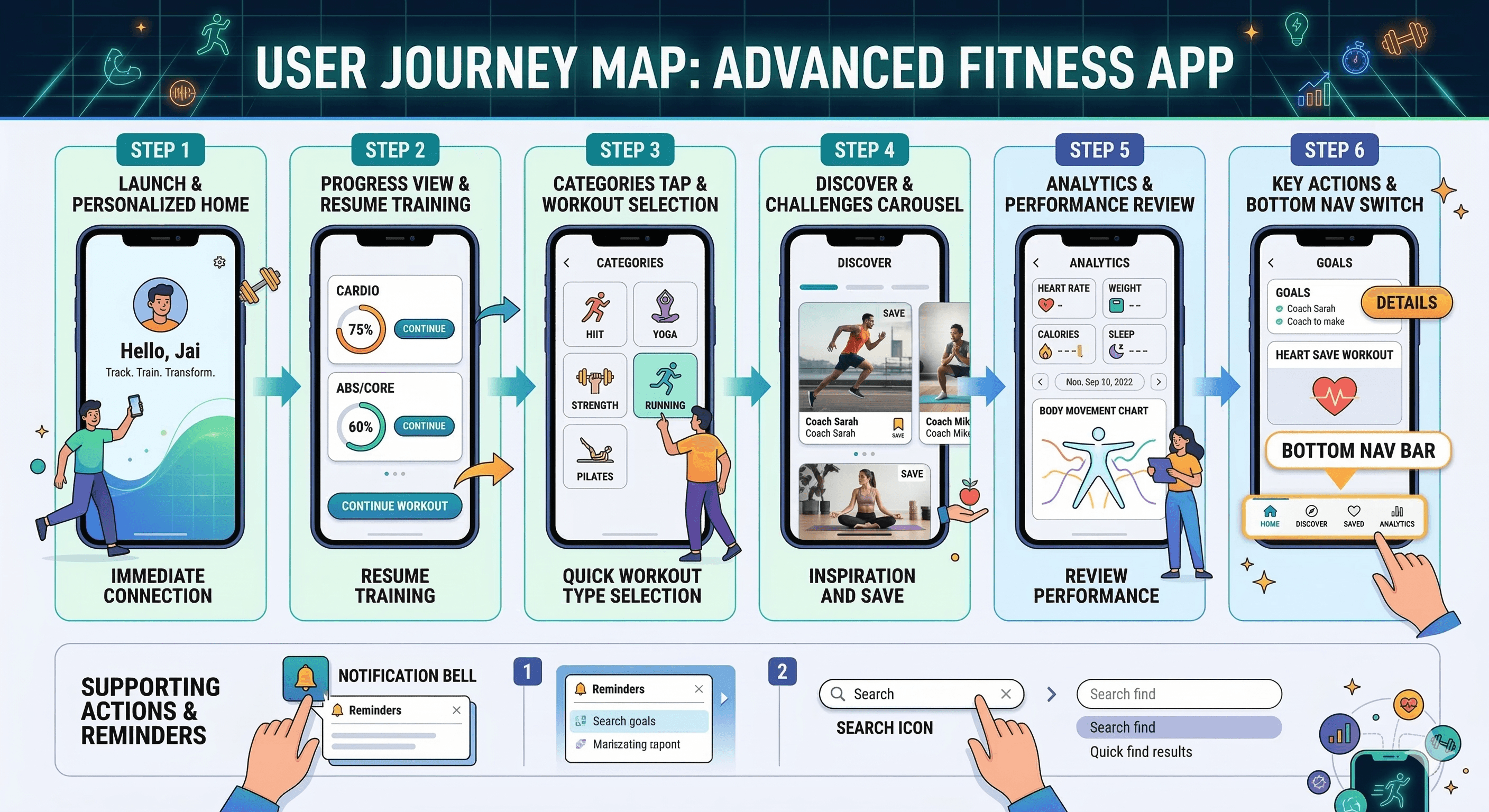
Step 1: Launch → personalized home (greeting "Hello, Jai" + tagline "Track. Train. Transform.") → immediate connection.
Step 2: Progress view → cards with % rings (Cardio, Abs/Core), continue workout CTA → resume training.
Step 3: Categories tap → icon grid for quick workout type selection.
Step 4: Challenges/Discover → carousel with photos/coach names → inspiration and save.
Step 5: Analytics tab → metrics cards (heart rate, weight, calories, sleep), date selector, body movement chart → review performance.
Step 6: Actions → tap Details on goals, heart save workout, bottom nav switch (Home/Discover/Saved/Analytics).
Supporting: Notification bell for reminders, search icon for quick find.
Design Principles
Dark theme priority → navy/black base for gym/evening comfort.
Data visualization first → large numbers (170 BPM, 105 KG), icons (heart, scale, fire, bed), charts (bar for movement).
Orange motivation → progress bars, CTAs, highlights for energy/action.
Personalization → greeting + avatar → user ownership.
Glanceability → metric cards with bold values/units/icons.
Gamification → % rings, trophy for completed goals, upgrade prompt.
Visual hierarchy → photos/carousels for discovery, charts for analytics.
Thumb-friendly → bottom nav, large CTAs, centered cards.
Consistency → orange accents, rounded elements, dark bg across screens.
Simplicity → minimal text, icon-first (categories, facilities).
Phase 3
Screens Breakdown – Analytics Dashboard Screen
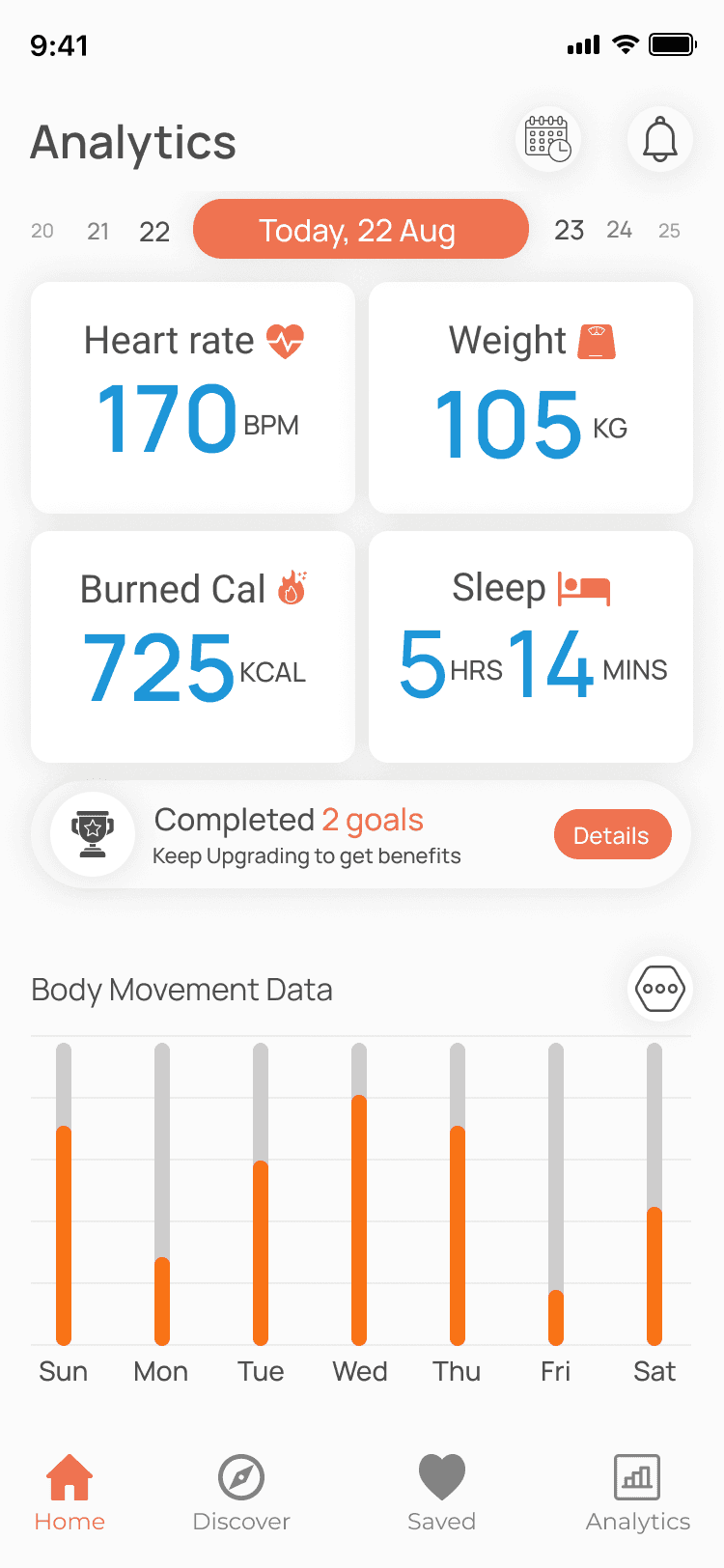
Header: "Analytics" title, calendar icon, bell notification.
Date selector: Horizontal scroll bar (20–25 dates) with orange "Today, 22 Aug" highlight.
Metric cards grid: Heart rate (170 BPM + heart icon), Weight (105 KG + scale), Burned Cal (725 KCAL + fire), Sleep (5 hrs 14 mins + bed icon) – large blue/orange numbers.
Goals section: Trophy icon + "Completed 2 goals" + "Keep Upgrading to get benefits" + orange Details button.
Body Movement chart: Weekly bar graph (Sun–Sat) with orange fill/gray base for activity levels.
Bottom nav: Home, Discover, Saved, Analytics (active).
Purpose: Provide at-a-glance daily/weekly performance, motivate via goals, visualize trends.
Screens Breakdown – Home / Progress Screen
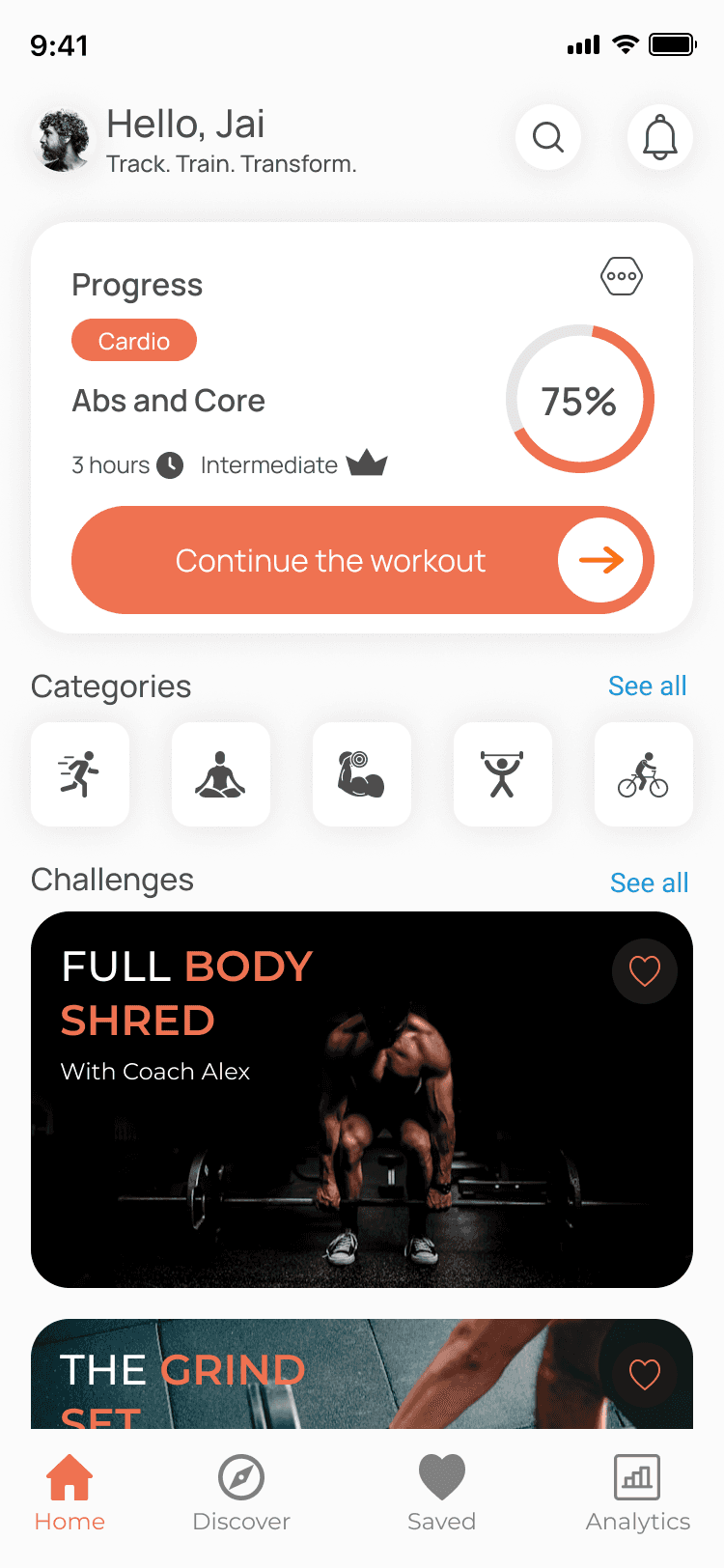
Header: Avatar + "Hello, Jai" greeting + search icon + bell.
Tagline: "Track. Train. Transform." → clear purpose.
Progress card: "Progress" title + hexagon icon, category labels (Cardio orange, Abs/Core), % ring (75%), time (3 hours), level (Intermediate + crown).
CTA: Orange "Continue the workout" pill button with arrow → resume flow.
Categories grid: Icons (running, yoga, weights, pull-up, bike) → quick access.
Challenges carousel: Full-body shred photo + title/coach + heart.
Bottom nav: Home active.
Purpose: Personalized start, quick resume, category discovery, motivation via progress %.
Screens Breakdown – Discover Screen
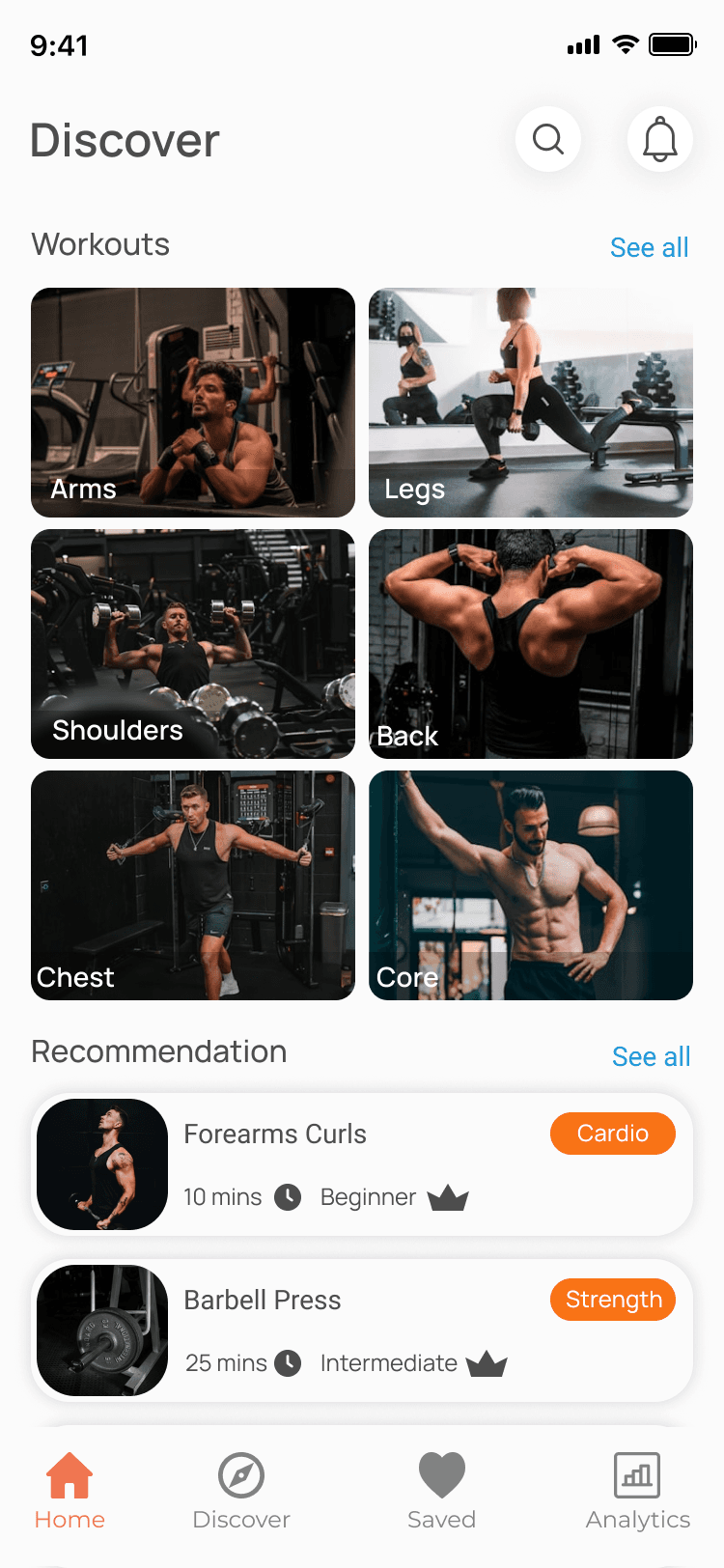
Header: "Discover" title + search + bell.
Workouts section: "Workouts" label + "See all".
Grid: 2x3 photos (Arms, Legs, Shoulders, Back, Chest, Core) with dark overlays.
Recommendations: Cards with photos, titles (Forearms Curls, Barbell Press), labels (Cardio/Strength orange), time (10/25 mins), level (Beginner/Intermediate + crown).
Bottom nav: Discover active.
Purpose: Visual workout discovery, curated recommendations with details (time/level).
Phase 4
UI Design & Visual System
Background: Dark navy/black → gym-friendly, premium.
Accents: Orange (#FF6B35) for progress/CTAs/charts, blue for sleep/metrics.
Text: White headings, gray subtext → contrast.
Images: High-res gym photos → motivation.
Typography: Bold sans-serif titles, medium body.
Components: % rings (circular progress), bar charts, icon tiles, rounded buttons.
Spacing: Generous padding, grid layouts.
Prototype & Interactions
Progress ring fill animation on load.
Carousel swipe in challenges/recommendations.
Tap category icon → filter/transition.
Continue/Details button press → scale/glow.
Bottom nav highlight switch.
Technical & Accessibility Considerations
Dark mode → low power/glare-free.
Contrast ≥4.5:1.
Touch targets ≥48px.
Alt text for icons/photos.
Responsive scaling.
UX Outcomes & Value
Dark mode → comfortable gym/evening use.
Progress % rings → clear motivation.
Metrics + charts → actionable insights.
Categories/grid → fast workout find.
Challenges → sustained engagement.
Overall: Clean, motivating, data-driven fitness companion.
Reflection & Learnings
Dark + orange creates energetic yet readable UI.
% rings + trophies drive gamification.
Personalized greeting boosts retention.
Photo-heavy discover inspires action.
Weekly charts reveal patterns.
Future: Add workout timer, social sharing, custom plans.
More Projects




UI / UX Design
IronFlow
IronFlow is a dark-mode gym companion app that empowers users to track vital fitness metrics (heart rate, weight, calories burned, sleep), visualize weekly progress through bar charts and percentage rings, discover categorized workouts (Arms, Legs, Core, etc.) with high-res photos, and stay motivated with gamified challenges, goals tracking, and personalized greetings. Designed for consistent training, it combines real-time data clarity with motivational visuals to help users build lasting strength and habits.
Year :
2025
Industry :
Gym
Client :
BodyBuilder
Project Duration :
2 weeks
Phase 1
Project Overview
The Gym Workouts App is a mobile fitness UI/UX design focused on workout tracking, progress visualization, discovery of exercises, and motivation through goals/challenges. It uses a dark theme (black/navy background) for eye comfort during gym sessions or evening reviews, orange accents (#FF6B35 approximate) for progress bars/CTAs/graphs, white/gray text for contrast, blue accents for some elements (sleep, rings), and high-resolution gym/workout photos as motivational visuals. Key screens include detailed analytics dashboard (metrics, charts, goals), personalized home/progress (greeting, progress rings, categories, challenges), and discover page (workout grid, recommendations). As solo designer, I created this in Figma, emphasizing data clarity, motivational visuals, and easy navigation to support consistent training habits.
Problem Statement
Many fitness apps overload users with cluttered dashboards, light themes causing glare in gym lighting, impersonal home screens, hard-to-read metrics, lack of quick workout discovery, and weak motivation (no clear progress % or challenges). Users struggle to track multiple metrics (heart rate, weight, calories, sleep, movement), see weekly patterns, stay motivated without gamification (goals/trophies), or find relevant workouts fast. This leads to low adherence, abandoned tracking, and demotivation. The design solves these with dark mode for gym-friendly viewing, personalized greeting + progress overview, clear metric cards with icons/units, weekly bar charts for patterns, category grid for discovery, recommendation cards with level/time/crown, and gamified elements (completed goals trophy, upgrade prompt).
Objectives
Provide dark-mode dashboard with glanceable metrics (heart rate BPM, weight KG, burned kcal, sleep hrs/mins) and visual charts.
Display date selector (calendar bar with "Today" highlight in orange) for time-based tracking.
Show progress % rings (e.g., 75% Core) with category labels and continue CTA.
Enable quick category access (running, yoga, weights, pull-up, bike icons) for workout browsing.
Curate challenges/workouts via carousel with photos, titles, coach names, heart wishlist.
Highlight achievements (completed 2 goals trophy + "Keep Upgrading" prompt + Details button).
Visualize body movement data in weekly bar chart (orange/gray fill for daily activity).
Include persistent bottom nav (Home, Discover, Saved, Analytics) for seamless switching.
Use orange for motivation (progress bars, CTAs, highlights), blue for rest metrics (sleep).
Balance data density with visual hierarchy (large numbers, icons, charts over text).
Support intermediate/advanced levels (crown icons, time/duration labels).
Phase 2
Target Users
User Journey Map
Step 1: Launch → personalized home (greeting "Hello, Jai" + tagline "Track. Train. Transform.") → immediate connection.
Step 2: Progress view → cards with % rings (Cardio, Abs/Core), continue workout CTA → resume training.
Step 3: Categories tap → icon grid for quick workout type selection.
Step 4: Challenges/Discover → carousel with photos/coach names → inspiration and save.
Step 5: Analytics tab → metrics cards (heart rate, weight, calories, sleep), date selector, body movement chart → review performance.
Step 6: Actions → tap Details on goals, heart save workout, bottom nav switch (Home/Discover/Saved/Analytics).
Supporting: Notification bell for reminders, search icon for quick find.
Design Principles
Dark theme priority → navy/black base for gym/evening comfort.
Data visualization first → large numbers (170 BPM, 105 KG), icons (heart, scale, fire, bed), charts (bar for movement).
Orange motivation → progress bars, CTAs, highlights for energy/action.
Personalization → greeting + avatar → user ownership.
Glanceability → metric cards with bold values/units/icons.
Gamification → % rings, trophy for completed goals, upgrade prompt.
Visual hierarchy → photos/carousels for discovery, charts for analytics.
Thumb-friendly → bottom nav, large CTAs, centered cards.
Consistency → orange accents, rounded elements, dark bg across screens.
Simplicity → minimal text, icon-first (categories, facilities).
Phase 3
Screens Breakdown – Analytics Dashboard Screen
Header: "Analytics" title, calendar icon, bell notification.
Date selector: Horizontal scroll bar (20–25 dates) with orange "Today, 22 Aug" highlight.
Metric cards grid: Heart rate (170 BPM + heart icon), Weight (105 KG + scale), Burned Cal (725 KCAL + fire), Sleep (5 hrs 14 mins + bed icon) – large blue/orange numbers.
Goals section: Trophy icon + "Completed 2 goals" + "Keep Upgrading to get benefits" + orange Details button.
Body Movement chart: Weekly bar graph (Sun–Sat) with orange fill/gray base for activity levels.
Bottom nav: Home, Discover, Saved, Analytics (active).
Purpose: Provide at-a-glance daily/weekly performance, motivate via goals, visualize trends.
Screens Breakdown – Home / Progress Screen
Header: Avatar + "Hello, Jai" greeting + search icon + bell.
Tagline: "Track. Train. Transform." → clear purpose.
Progress card: "Progress" title + hexagon icon, category labels (Cardio orange, Abs/Core), % ring (75%), time (3 hours), level (Intermediate + crown).
CTA: Orange "Continue the workout" pill button with arrow → resume flow.
Categories grid: Icons (running, yoga, weights, pull-up, bike) → quick access.
Challenges carousel: Full-body shred photo + title/coach + heart.
Bottom nav: Home active.
Purpose: Personalized start, quick resume, category discovery, motivation via progress %.
Screens Breakdown – Discover Screen
Header: "Discover" title + search + bell.
Workouts section: "Workouts" label + "See all".
Grid: 2x3 photos (Arms, Legs, Shoulders, Back, Chest, Core) with dark overlays.
Recommendations: Cards with photos, titles (Forearms Curls, Barbell Press), labels (Cardio/Strength orange), time (10/25 mins), level (Beginner/Intermediate + crown).
Bottom nav: Discover active.
Purpose: Visual workout discovery, curated recommendations with details (time/level).
Phase 4
UI Design & Visual System
Background: Dark navy/black → gym-friendly, premium.
Accents: Orange (#FF6B35) for progress/CTAs/charts, blue for sleep/metrics.
Text: White headings, gray subtext → contrast.
Images: High-res gym photos → motivation.
Typography: Bold sans-serif titles, medium body.
Components: % rings (circular progress), bar charts, icon tiles, rounded buttons.
Spacing: Generous padding, grid layouts.
Prototype & Interactions
Progress ring fill animation on load.
Carousel swipe in challenges/recommendations.
Tap category icon → filter/transition.
Continue/Details button press → scale/glow.
Bottom nav highlight switch.
Technical & Accessibility Considerations
Dark mode → low power/glare-free.
Contrast ≥4.5:1.
Touch targets ≥48px.
Alt text for icons/photos.
Responsive scaling.
UX Outcomes & Value
Dark mode → comfortable gym/evening use.
Progress % rings → clear motivation.
Metrics + charts → actionable insights.
Categories/grid → fast workout find.
Challenges → sustained engagement.
Overall: Clean, motivating, data-driven fitness companion.
Reflection & Learnings
Dark + orange creates energetic yet readable UI.
% rings + trophies drive gamification.
Personalized greeting boosts retention.
Photo-heavy discover inspires action.
Weekly charts reveal patterns.
Future: Add workout timer, social sharing, custom plans.
More Projects
UI / UX Design
IronFlow
IronFlow is a dark-mode gym companion app that empowers users to track vital fitness metrics (heart rate, weight, calories burned, sleep), visualize weekly progress through bar charts and percentage rings, discover categorized workouts (Arms, Legs, Core, etc.) with high-res photos, and stay motivated with gamified challenges, goals tracking, and personalized greetings. Designed for consistent training, it combines real-time data clarity with motivational visuals to help users build lasting strength and habits.
Year :
2025
Industry :
Gym
Client :
BodyBuilder
Project Duration :
2 weeks
Phase 1
Project Overview
The Gym Workouts App is a mobile fitness UI/UX design focused on workout tracking, progress visualization, discovery of exercises, and motivation through goals/challenges. It uses a dark theme (black/navy background) for eye comfort during gym sessions or evening reviews, orange accents (#FF6B35 approximate) for progress bars/CTAs/graphs, white/gray text for contrast, blue accents for some elements (sleep, rings), and high-resolution gym/workout photos as motivational visuals. Key screens include detailed analytics dashboard (metrics, charts, goals), personalized home/progress (greeting, progress rings, categories, challenges), and discover page (workout grid, recommendations). As solo designer, I created this in Figma, emphasizing data clarity, motivational visuals, and easy navigation to support consistent training habits.
Problem Statement
Many fitness apps overload users with cluttered dashboards, light themes causing glare in gym lighting, impersonal home screens, hard-to-read metrics, lack of quick workout discovery, and weak motivation (no clear progress % or challenges). Users struggle to track multiple metrics (heart rate, weight, calories, sleep, movement), see weekly patterns, stay motivated without gamification (goals/trophies), or find relevant workouts fast. This leads to low adherence, abandoned tracking, and demotivation. The design solves these with dark mode for gym-friendly viewing, personalized greeting + progress overview, clear metric cards with icons/units, weekly bar charts for patterns, category grid for discovery, recommendation cards with level/time/crown, and gamified elements (completed goals trophy, upgrade prompt).
Objectives
Provide dark-mode dashboard with glanceable metrics (heart rate BPM, weight KG, burned kcal, sleep hrs/mins) and visual charts.
Display date selector (calendar bar with "Today" highlight in orange) for time-based tracking.
Show progress % rings (e.g., 75% Core) with category labels and continue CTA.
Enable quick category access (running, yoga, weights, pull-up, bike icons) for workout browsing.
Curate challenges/workouts via carousel with photos, titles, coach names, heart wishlist.
Highlight achievements (completed 2 goals trophy + "Keep Upgrading" prompt + Details button).
Visualize body movement data in weekly bar chart (orange/gray fill for daily activity).
Include persistent bottom nav (Home, Discover, Saved, Analytics) for seamless switching.
Use orange for motivation (progress bars, CTAs, highlights), blue for rest metrics (sleep).
Balance data density with visual hierarchy (large numbers, icons, charts over text).
Support intermediate/advanced levels (crown icons, time/duration labels).
Phase 2
Target Users
User Journey Map
Step 1: Launch → personalized home (greeting "Hello, Jai" + tagline "Track. Train. Transform.") → immediate connection.
Step 2: Progress view → cards with % rings (Cardio, Abs/Core), continue workout CTA → resume training.
Step 3: Categories tap → icon grid for quick workout type selection.
Step 4: Challenges/Discover → carousel with photos/coach names → inspiration and save.
Step 5: Analytics tab → metrics cards (heart rate, weight, calories, sleep), date selector, body movement chart → review performance.
Step 6: Actions → tap Details on goals, heart save workout, bottom nav switch (Home/Discover/Saved/Analytics).
Supporting: Notification bell for reminders, search icon for quick find.
Design Principles
Dark theme priority → navy/black base for gym/evening comfort.
Data visualization first → large numbers (170 BPM, 105 KG), icons (heart, scale, fire, bed), charts (bar for movement).
Orange motivation → progress bars, CTAs, highlights for energy/action.
Personalization → greeting + avatar → user ownership.
Glanceability → metric cards with bold values/units/icons.
Gamification → % rings, trophy for completed goals, upgrade prompt.
Visual hierarchy → photos/carousels for discovery, charts for analytics.
Thumb-friendly → bottom nav, large CTAs, centered cards.
Consistency → orange accents, rounded elements, dark bg across screens.
Simplicity → minimal text, icon-first (categories, facilities).
Phase 3
Screens Breakdown – Analytics Dashboard Screen
Header: "Analytics" title, calendar icon, bell notification.
Date selector: Horizontal scroll bar (20–25 dates) with orange "Today, 22 Aug" highlight.
Metric cards grid: Heart rate (170 BPM + heart icon), Weight (105 KG + scale), Burned Cal (725 KCAL + fire), Sleep (5 hrs 14 mins + bed icon) – large blue/orange numbers.
Goals section: Trophy icon + "Completed 2 goals" + "Keep Upgrading to get benefits" + orange Details button.
Body Movement chart: Weekly bar graph (Sun–Sat) with orange fill/gray base for activity levels.
Bottom nav: Home, Discover, Saved, Analytics (active).
Purpose: Provide at-a-glance daily/weekly performance, motivate via goals, visualize trends.
Screens Breakdown – Home / Progress Screen
Header: Avatar + "Hello, Jai" greeting + search icon + bell.
Tagline: "Track. Train. Transform." → clear purpose.
Progress card: "Progress" title + hexagon icon, category labels (Cardio orange, Abs/Core), % ring (75%), time (3 hours), level (Intermediate + crown).
CTA: Orange "Continue the workout" pill button with arrow → resume flow.
Categories grid: Icons (running, yoga, weights, pull-up, bike) → quick access.
Challenges carousel: Full-body shred photo + title/coach + heart.
Bottom nav: Home active.
Purpose: Personalized start, quick resume, category discovery, motivation via progress %.
Screens Breakdown – Discover Screen
Header: "Discover" title + search + bell.
Workouts section: "Workouts" label + "See all".
Grid: 2x3 photos (Arms, Legs, Shoulders, Back, Chest, Core) with dark overlays.
Recommendations: Cards with photos, titles (Forearms Curls, Barbell Press), labels (Cardio/Strength orange), time (10/25 mins), level (Beginner/Intermediate + crown).
Bottom nav: Discover active.
Purpose: Visual workout discovery, curated recommendations with details (time/level).
Phase 4
UI Design & Visual System
Background: Dark navy/black → gym-friendly, premium.
Accents: Orange (#FF6B35) for progress/CTAs/charts, blue for sleep/metrics.
Text: White headings, gray subtext → contrast.
Images: High-res gym photos → motivation.
Typography: Bold sans-serif titles, medium body.
Components: % rings (circular progress), bar charts, icon tiles, rounded buttons.
Spacing: Generous padding, grid layouts.
Prototype & Interactions
Progress ring fill animation on load.
Carousel swipe in challenges/recommendations.
Tap category icon → filter/transition.
Continue/Details button press → scale/glow.
Bottom nav highlight switch.
Technical & Accessibility Considerations
Dark mode → low power/glare-free.
Contrast ≥4.5:1.
Touch targets ≥48px.
Alt text for icons/photos.
Responsive scaling.
UX Outcomes & Value
Dark mode → comfortable gym/evening use.
Progress % rings → clear motivation.
Metrics + charts → actionable insights.
Categories/grid → fast workout find.
Challenges → sustained engagement.
Overall: Clean, motivating, data-driven fitness companion.
Reflection & Learnings
Dark + orange creates energetic yet readable UI.
% rings + trophies drive gamification.
Personalized greeting boosts retention.
Photo-heavy discover inspires action.
Weekly charts reveal patterns.
Future: Add workout timer, social sharing, custom plans.